Reading & Understanding
How to ask better questions about a PDF and verify citations
A practical walkthrough for choosing sources, writing focused questions, checking cited passages, and saving useful answers in notebaseAI.
- Citations
A useful answer starts with a checkable question.
Choose the source, name the job, and ask for the evidence. Then open the citation and check whether the passage supports the answer. This guide walks through that loop in notebaseAI’s PDF chat.
You can read the guide without an account. Following the steps in your own notebook requires signing in and uses your plan’s upload allowance and chat credits.
1. Start with one ready PDF
For your first question, choose a short document you can read yourself. It is easier to check an answer against a two-page brief than against a long folder of unfamiliar papers.
- Create a notebook and give it a recognizable title, such as “PDF reading workshop.”
- Open Add sources, choose Upload files, and select your PDF. A new, empty notebook may open the source dialog automatically.
- Wait for processing to finish, then check that the PDF is selected in the Sources panel. Questions use the selected sources.
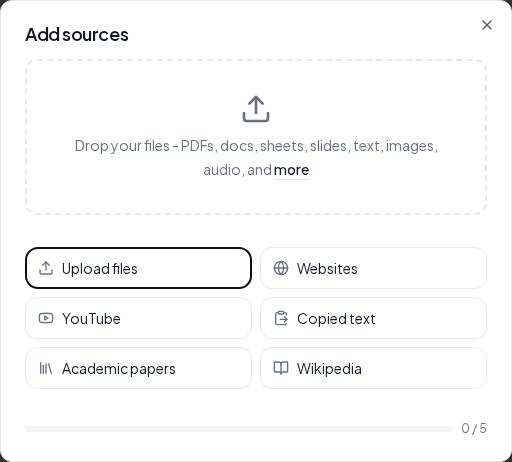
Keep just one source selected while you learn the workflow. Add more when you are ready to compare documents, and check the selection again before changing topics.
2. Give your question a job
“Summarize this” can be a useful starting point, but it leaves the scope and level of detail open. A more focused question names the topic, the task, and the form of answer you need.
What does this brief conclude about year-round effects? Separate what was observed from what remains untested, and cite the source.
Here are four jobs you can give a question. Adapt the wording to the document you selected.
| Your goal | A question to try |
|---|---|
| Understand | What question does this paper try to answer? Explain the main conclusion and cite the supporting passage. |
| Find evidence | What evidence supports the claim about shaded blocks? Separate the observation from the interpretation. |
| Check limits | Which limitations does the author state? Distinguish stated limitations from your own suggestions. |
| Compare | Compare the methods in the two selected papers. Identify the source for each point and flag missing information. |
For a comparison, select both sources first. If a requested fact is absent, ask the answer to say that explicitly instead of filling the gap with a plausible guess.
3. Verify the cited passage
When an answer includes an inline citation, click it. The source reader opens the referenced material so you can inspect it alongside the conversation.
- Check the wording. Does the passage actually make the claim, or does it describe a possibility, assumption, or plan?
- Check the scope. Are the population, place, period, and conditions the same as those described in the answer?
- Read nearby context. Look for caveats, missing measurements, and qualifications that a short answer may leave out.
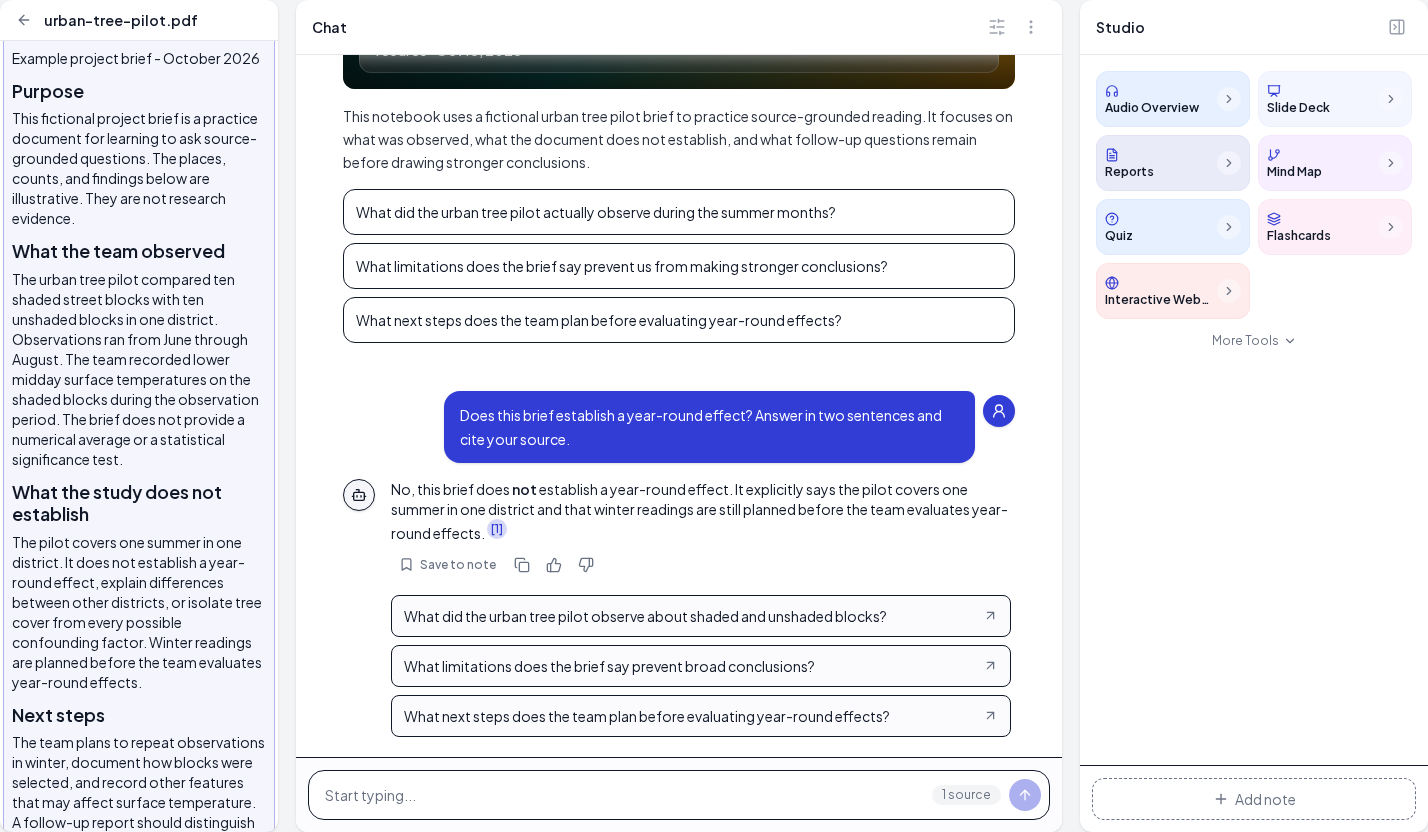
A citation is a route back to evidence. It does not guarantee that the interpretation is correct. If the source does not support the claim, ask a narrower follow-up and verify again.
4. Try a short example
The practice PDF below is a fictional urban-tree project brief. Its observations, counts, and findings are invented for this exercise; they are not published research evidence.
Download the practice PDFThe brief describes summer observations, gives no numerical average or significance test, and says winter readings are planned. Upload it and try this question:
Does this brief establish a year-round effect? Answer in two sentences and cite your source.
Check whether the answer preserves the distinction between summer observations and year-round conclusions. Follow its citation to the limitation about the observation period and the planned winter readings. The wording of your generated answer may differ from the example.
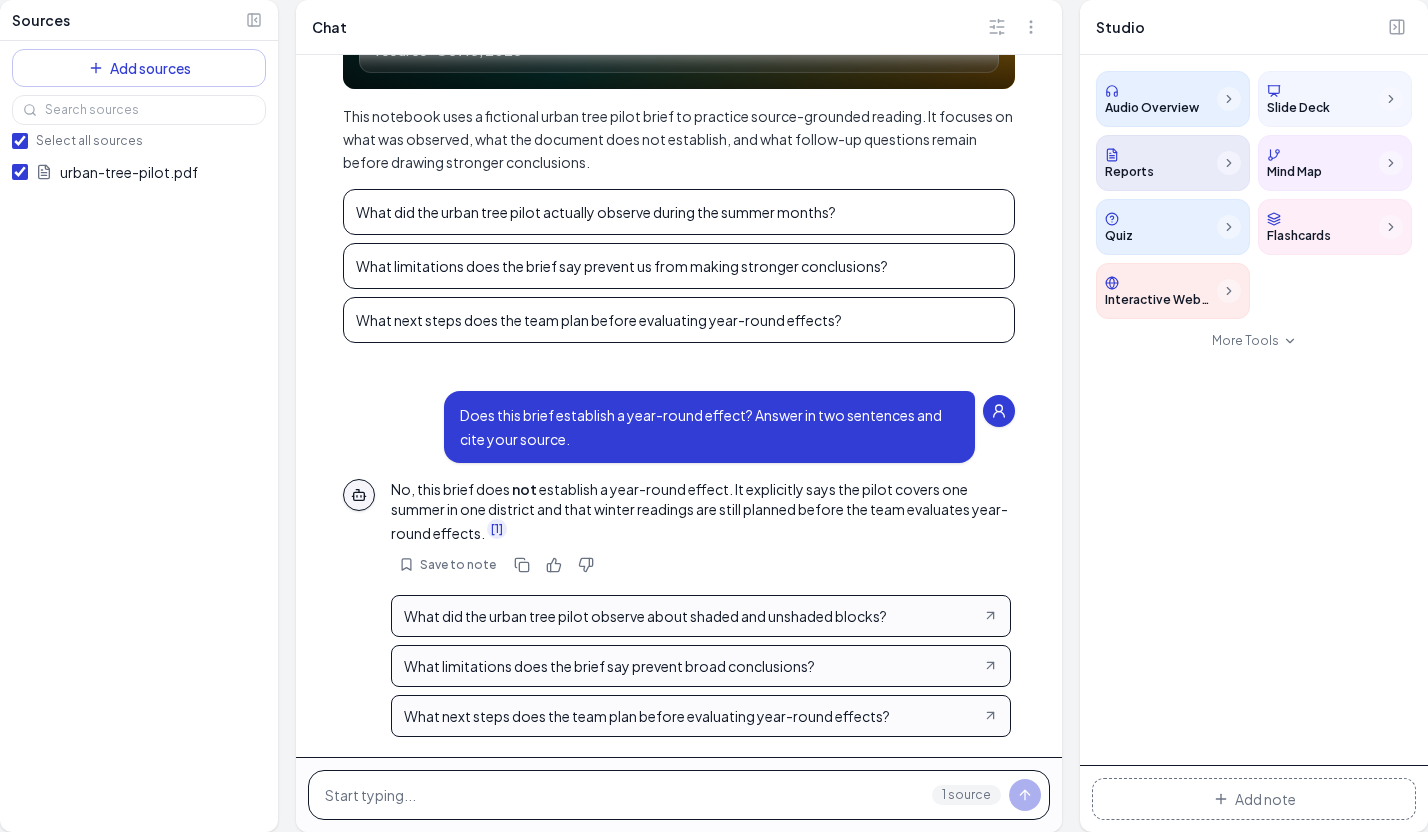
Then ask “What numerical average does the brief report?” A careful reading should recognize that the document does not provide one. This gives you a second, quick way to test whether an answer stays within the available evidence.
5. Save the answer and choose your next step
Once you have checked the evidence, choose Save to note under the answer. Keep your own interpretation and questions with the note so a convenient summary does not replace your reading of the source.
You can continue in the same notebook with a narrower follow-up or select another ready source for a comparison. When you want practice material, Studio can turn selected sources into a quiz, flashcards, or a study guide.
If listening works better for your next review session, explore the AI podcast generator. For a collection of research papers, see the literature review workflow.
6. When something goes wrong
- The chat input is unavailable
- Check that at least one source has finished processing and is selected. Uploading a file and having a ready source are separate steps.
- The answer is too broad
- Select fewer sources and name one task. Ask for the author’s stated conclusion, a specific limitation, or the evidence behind a single claim.
- A citation seems unrelated
- Read the surrounding source text and ask which exact statement supports the answer. If you cannot verify the connection, leave the claim out of your notes until you can check it.
- An upload or response fails
- Read the error shown in the notebook. Check the file size, source allowance, and available credits before retrying. If document processing fails repeatedly, try a readable text-based PDF and confirm that its content appears in the source reader.
A useful review loop is simple: select a source, ask a focused question, check the passage, and save what you can support.